Self Hosting LightCMS
InstallerGuide to themselves host LightCMS, covering the GitHub App, PostgreSQL, environment variables, optional AI, CDN and email, and deploying to edge.
Vil du ha LightCMS helt under kontrollen? LightCMS er en SvelteKit applikasjon, så det kan distribueres hvor som helst, støttet av en PostgreSQL database og en GitHub App (Octokit). Ditt innhold forlater aldri ditt eget GitHub-lager.
Denne guiden går gjennom alt du trenger for å kjøre din egen instans: lage GitHub Appen, midlertidig PostgreSQL, konfigurere miljøvariabler og distribusjon.
Hvordan brikkene passer sammen
| Komponent | Formål | Påkrevd |
|---|---|---|
| PostgreSQL | Lagrer brukere, sesjoner, tilgangskilder og GitHub installasjoner | Ja |
| GitHub App | Leser og skriver innhold i dine kodelagre og tegn brukere på med GitHub | Ja |
| SMTP leverandør | Sender e-post for magiker-kobling | Ja, for innlogging i magiker |
| OpenAI-kompatibelt API | Styrker AI Copilot | Valgfritt |
| Taler til tekst API | Styrker diktning av stemme | Valgfritt |
| Bilde CDN | Verter bilder lastet opp i editoren | Valgfritt |
| PostHog | Produktanalyser og AI observasjonsevne | Påkrevd kun i utviklingsprosessen |
Forutsetninger
- mise: installerer og styrer avhengigheter i arbeidsoppgaver. Denne guiden forutsetter at du har den installert.
- PostgreSQL: en database som aksepterer TLS-tilkoblinger. Sky-leverandører som Neon, Supabase eller Nile fungerer bra. Se awesome-free-postgres for gratis alternativer.
- GitHub konto: nødvendig for å registrere GitHub appen.
- SMTP-leverandør (for magiske linker): Hvis du har et domene, er Send et godt alternativ. Hvis ikke, bruk Zoho Mail og opprett et app-passord.
TLS er obligatorisk. programmet kobler til PostgreSQL med
ssl: "require". En lokal PostgreSQL forekomst uten TLS aktivert vil bli avvist, så bruk en hosted database eller konfigurer TLS på din egen server.
1. Fork depotet og installer avhengigheter
Klon depotet og installere avhengigheter:
cd lightcms
mise trust
mise deps
mising run install
2. Create the GitHub App
LightCMS bruker en GitHub App, for to ting: signere brukere på GitHub (OAuth), og arbeider på dine vegne gjennom installasjoner. Du kan lage den med den som er bygget i Probot oppsettsveiviseren, eller for hånd.
Alternativ A: Probot installasjonsveiviser
start botten med:
Mise run botMed ingen legitimasjon i .env, starter Probot en oppsettsserver på http://localhost:3000:
- Åpne
http://localhost:3000og klikk på GitHub App. - Velg din personlige konto eller en organisasjon.
- Bekreftet. Probot oppretter appen og skriver dens innloggingsinformasjon til filen
.env.
Veiviseren setter applikasjonens webhook URL til en Smee-kanal (eller http://localhost:3000/), og ikke til endepunktets webhook for LightCMS. Oppdater den i GitHub App-innstillingene før du går live (se Produksjon-deployment).
Alternativ B: Manuelt oppsett
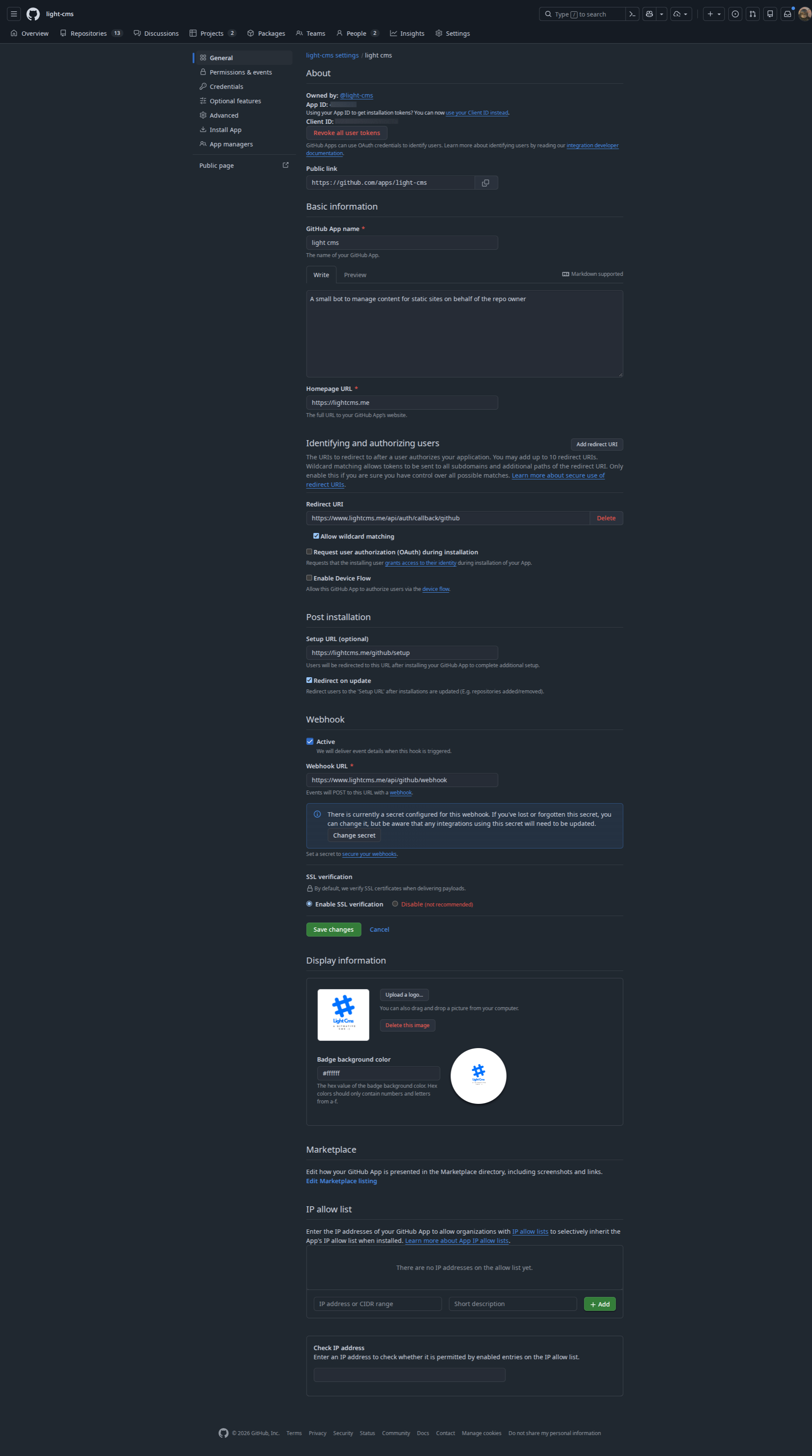
Lag appen i GitHub innstillinger → Utvikler innstillinger → GitHub apper → Nye GitHub App med disse verdiene:
| Innstilling | Verdi |
|---|---|
| URL til hjemmeside | https://<your-domain> |
| Callback URL | https://<your-domain>/api/auth/callback/github |
| Setup URL | https://<your-domain>/github/setup |
| Nettkrok URL | https://<your-domain>/api/github/webhook |
| Webhook hemmelig | En tilfeldig hemmelig (se Genererer hemmeligheter) |
Repository tillatelser
| Tillatelse | Tilgang | Brukes til |
|---|---|---|
Innhold |
Lese og skrive | Leser og forandrer innholdsfiler |
Issues |
Read and write | Review comments and labels on pull requests |
Pull requests |
Read-only | Listing the files changed in a pull request |
Commit statuses |
Read and write | Reporting content validation on pushes |
Metadata |
Read-only | Mandatory for every GitHub App |
Subscribe to events: Push and Pull request. Installation events are delivered to GitHub Apps automatically.
After creating the app, note the App ID, generate a client secret, and generate and download a private key (.pem).
3. Configure environment variables
Create a .env file in the project root. The repository does not ship a usable example file, so use the reference below.
Required
# ---------------------------------------------------------------------------
# Authentication (Better Auth)
# ---------------------------------------------------------------------------
BETTER_AUTH_SECRET="<output of: openssl rand -hex 32>"
# Public URL of this instance. Must match the URL users visit.
BETTER_AUTH_URL="http://localhost:5173"

# ---------------------------------------------------------------------------
# Database (PostgreSQL, TLS required)
# ---------------------------------------------------------------------------
DATABASE_URL="postgresql://user:password@host:5432/lightcms?sslmode=require"

# ---------------------------------------------------------------------------
# GitHub App
# ---------------------------------------------------------------------------
GITHUB_APP_ID="123456"
GITHUB_CLIENT_ID="Iv1.xxxxxxxxxxxx"
GITHUB_CLIENT_SECRET="<github-app-client-secret>"
GITHUB_WEBHOOK_SECRET="<webhook-secret>"
GITHUB_PRIVATE_KEY="-----BEGIN RSA PRIVATE KEY-----
...
-----END RSA PRIVATE KEY-----"
GITHUB_PRIVATE_KEY is the full PEM contents. Keep the line breaks and wrap the value in double quotes, which is how the Probot wizard writes it.
Required for development
LightCMS reports analytics and errors to PostHog. When the keys are missing, the app throws in development to stop events being silently dropped. In production they are optional, and telemetry is skipped when they are unset.
VITE_POSTHOG_PROJECT_TOKEN="phc_xxxxxxxxxxxx"
VITE_POSTHOG_HOST="https://us.i.posthog.com"
Email: required for magic-link sign-in
Magic links are sent over SMTP with Nodemailer. Sending fails with a configuration error when MAIL_HOST, MAIL_USER, MAIL_PASS or MAIL_FROM is missing.
MAIL_HOST="smtp.resend.com"
# Defaults to 587 when omitted
MAIL_PORT="465"
# "true", "1", "yes" or "on" enables implicit TLS. When omitted, TLS is enabled only for port 465.
MAIL_SECURE="1"
MAIL_USER="resend"
MAIL_PASS="<smtp-password-or-api-key>"
MAIL_FROM="LightCMS <[email protected]>"
Optional: AI Copilot
The Copilot uses any OpenAI-compatible chat completions API. All three variables are needed for it to work.
OPEN_AI_ENDPOINT="https://api.openai.com/v1"
OPEN_AI_APIKEY="sk-..."
OPEN_AI_MODEL="gpt-4o-mini"
Any provider that exposes an OpenAI-compatible API works, for example OpenAI, OpenRouter (https://openrouter.ai/api/v1) or NVIDIA NIM.
Optional: speech-to-text dictation
LightCMS supports two transcription backends. When both are configured, the OpenAI-compatible backend is used.
OpenAI-compatible transcription. It is selected when SPEECH_API_KEY is set, and also needs SPEECH_MODEL:
SPEECH_API_KEY="<api-key>"
SPEECH_MODEL="whisper-1"
# Base URL of the provider. Omit it to use the OpenAI default.
SPEECH_ENDPOINT="https://api.openai.com/v1"
Point SPEECH_ENDPOINT at any provider that implements the /audio/transcriptions API, and set SPEECH_MODEL to a model that provider offers. A trailing /audio/transcriptions in the endpoint is stripped automatically.
Wit.ai is used when SPEECH_API_KEY is not set:
WIT_AI_TOKEN="<wit-ai-server-access-token>"If neither is configured, dictation is unavailable.
Optional: image uploads (CDN)
Images pasted or uploaded in the editor are sent to a Chevereto-compatible upload API. Hosted options include FreeImage.host and ImgBB, or you can run your own Chevereto instance.
CDN_URL="https://freeimage.host/api/1/upload"
CDN_KEY="<cdn-api-key>"
CDN_KEY is sent as the key query parameter unless CDN_URL already contains one. If the upload fails or the variables are unset, LightCMS falls back to embedding the image in the document as a base64 data: URL. This works, but it makes your Markdown files much larger, so configure a CDN for real use.
Local Webhook Forwarding (Development Only)
WEBHOOK_PROXY_URL="https://smee.io/<your-channel>"This is read by Probot, not by the SvelteKit app. See Testing webhooks locally.
Generating secrets
Use any of these to generate BETTER_AUTH_SECRET and GITHUB_WEBHOOK_SECRET:
openssl rand -hex 32
# or
node -e "console.log(require('crypto').randomBytes(32).toString('hex'))"
4. Set up the database
LightCMS uses Drizzle ORM. The schema lives in src/lib/server/db/schema.ts, and migrations are generated into the drizzle directory. With DATABASE_URL set, apply the migrations:
bun run db:migrateDuring local development you can instead push the schema straight to the database, without migration files:
bun run db:pushOther database scripts:
| Command | Description |
|---|---|
bun run db:generate |
Generate a migration after editing the schema |
bun run db:studio |
Browse and edit your data in Drizzle Studio |
5. Run locally
bun run dev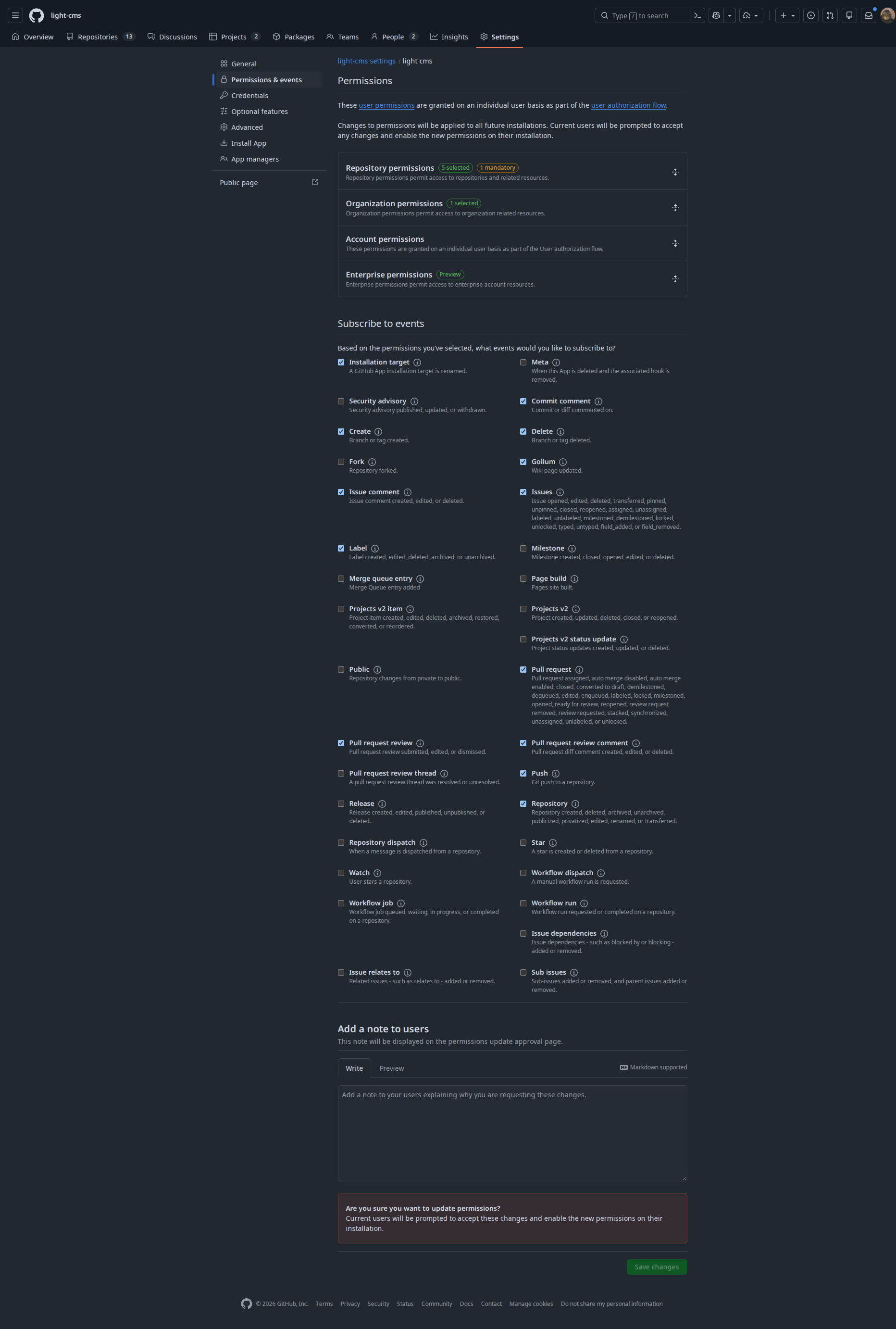

LightCMS is now available at http://localhost:5173. Set BETTER_AUTH_URL to this address, and sign in with GitHub for the first time.
Testing webhooks locally
GitHub cannot deliver webhooks to localhost, so forward them through smee.io:
Create a channel at smee.io and copy its URL.
Set
WEBHOOK_PROXY_URLin.envto that URL.Set the Webhook URL in your GitHub App settings to the same URL.
Run the bot in a second terminal:
bun run bot:start
The bot registers the same handlers as the production endpoint: content validation on push, review comments and labels on pull_request, and installation logging.
6. Production deployment
The project is configured with SvelteKit, which is vendor agnostic. Vercel, Netlify and Cloudflare Workers are all supported deployment targets out of the box.
- Import your Git repository into deployment platform.
- Add every environment variable from step 3 in Project Settings → Environment Variables. Set
BETTER_AUTH_URLto your production URL. - Deploy.
To verify the production build locally:
bun run build
bun run preview
Troubleshooting
Make a account with Wit.ai it's a free service by meta | And any openai compatible API for transcription. | One can use groq or assemblyai or | elevenlabs or deepgram or sarvam. |
PostHog Credentials
Use the project token from your own PostHog project (Project settings → Project API key). Do not reuse a token from this documentation: events sent with a shared token land in someone else's project, so its insights, alerts and notifications are not yours to read.
VITE_POSTHOG_PROJECT_TOKEN=phc_your_project_token
VITE_POSTHOG_HOST=https://us.i.posthog.com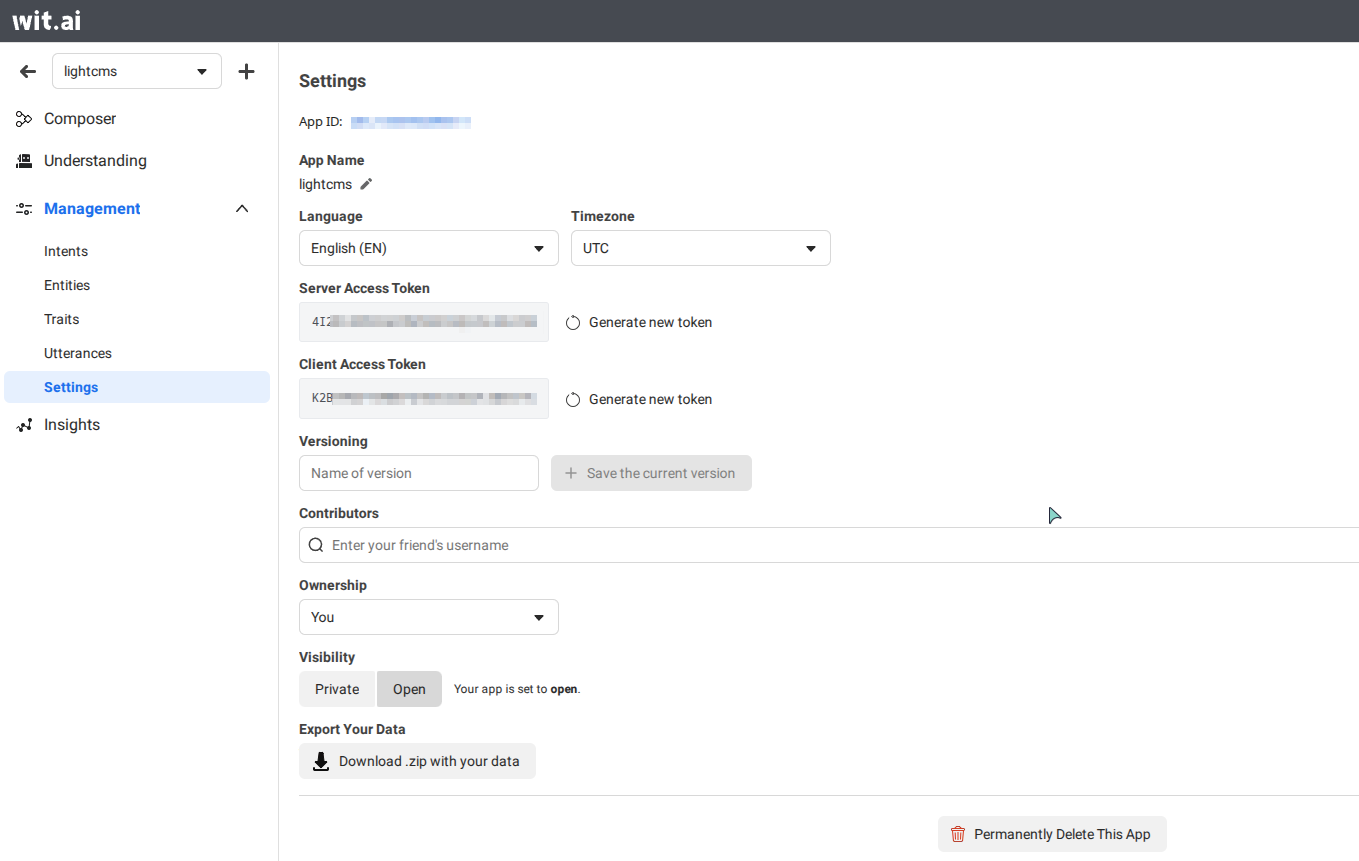
WIT_AI_TOKEN="Server access token"
WIT_AI_CLIENT_TOKEN="Client access token"
APP_ID=
BETTER_AUTH_SECRET=
BETTER_AUTH_URL=
CDN_KEY=
CDN_URL=
DATABASE_URL=
GITHUB_APP_ID=
GITHUB_APP_NAME=
GITHUB_CLIENT_ID=
GITHUB_CLIENT_SECRET=
GITHUB_PRIVATE_KEY=
GITHUB_WEBHOOK_SECRET=
MAIL_FROM=
MAIL_HOST=
MAIL_PASS=
MAIL_PORT=
MAIL_SECURE=
MAIL_USER=
OPEN_AI_ENDPOINT=
OPEN_AI_MODEL=
OPEN_AI_APIKEY=
ORIGIN=
PRIVATE_KEY=
VITE_POSTHOG_HOST=
VITE_POSTHOG_PROJECT_TOKEN=
SPEECH_API_KEY=
SPEECH_ENDPOINT=
SPEECH_MODEL=
WEBHOOK_SECRET=
WIT_AI_CLIENT_TOKEN=
WIT_AI_TOKEN=